Why Replace Your ISP’s ONT With a GPON Stick?
A stock fiber connection looks like this:
Fiber → ISP ONT → Ethernet → ISP router or your router
Two boxes, two power bricks, one copper cable between them, and one of those boxes is entirely out of your control. The ISP owns it, patches it on its own schedule, and gives you no visibility into what it’s actually doing on the line.
A GPON stick collapses that into one box:
Fiber → GPON ONU/ONT stick → SFP port in your router
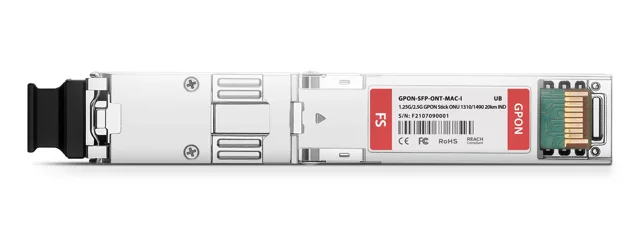
I did this swap on my own UniFi Gateway Fiber, replacing the ISP’s ONT and router with an FS.com GPON-ONU-34-20BI stick (the full how-to guide covers exactly how). Why bother, you may ask? Partly because tinkering with hardware is fun. Mostly because there are real security and privacy reasons to get a sealed, vendor-controlled box off your WAN edge. There are trade-offs too, and I’ll mention those.
Key Takeaways
- The swap cut continuous power draw by about 7W on my own rack, worth roughly €18 a year at the EU’s H2 2025 average electricity price of €0.2896/kWh (Eurostat).
- It removes a sealed, vendor-controlled gateway from the WAN edge, closing off both unpatched firmware risk and Wi-Fi motion sensing commercialized by ISPs.
- The hard part is authentication: you need to extract and reproduce your ISP ONT’s serial number, PLOAM/LOID credentials, and OMCI IDs, and you give up ISP support once you do.
Lower Idle Power Draw
Power consumption is often a deciding factor when I’m planning changes to my homelab, so I’ll start here.
Standalone fiber ONTs commonly draw somewhere in the low-to-mid single digits of watts, up to around 10-15W depending on the model, and a setup with a separate ONT plus router adds up faster than either box alone suggests. A GPON stick removes one of those boxes’ power draw entirely, since the optical termination now shares the gateway’s power supply.
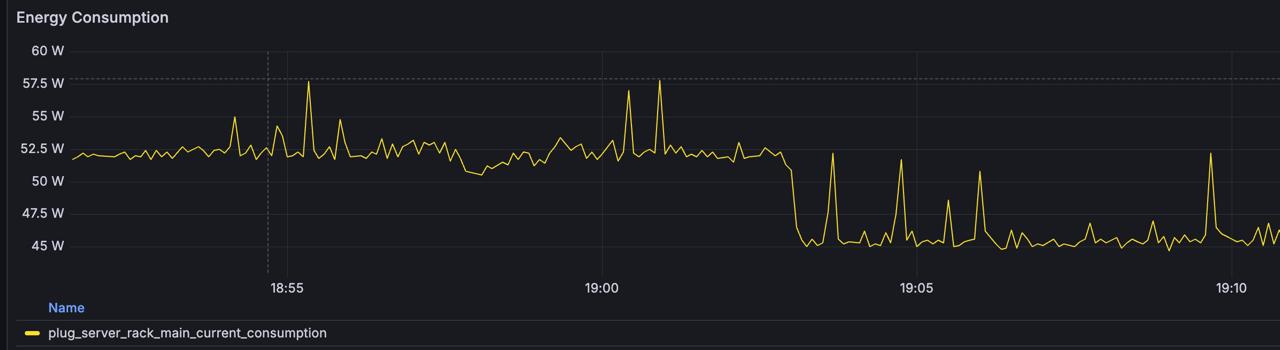
On my own homelab, the swap worked out to about 7W less continuous draw from the wall, which is a sweet drop visible in the graph above. That’s not a dramatic number, but at the EU’s average household electricity price of €0.2896 per kWh in the second half of 2025 (Eurostat electricity price statistics), 7W running 24/7 works out to roughly €18 a year. The stick should pay for itself in electricity savings in around three years.
Fewer Boxes, One Less Hop, Lower Latency
Removing the ISP’s ONT, and its router too if it wasn’t already in bridge mode, takes a device and a copper cable out of the path between the fiber and your firewall or router. For a homelab, that’s one less power brick, one less Ethernet run, and one less box adding heat to an enclosed cabinet. It also shaves some sub-millisecond delay from the hot data path, so that’s pretty sweet, am I right?
Once the ONT is gone, the optical termination lives inside equipment you fully control. That’s where the security and privacy benefits kick in.
Control and Visibility Over the WAN Edge
With the ISP’s ONT in the loop, you can’t see optical receive levels, registration state, or firmware version. It’s a sealed box that reports what it wants to, when it wants to, through whatever interface the ISP decided to expose, often none at all. With a GPON stick you configure yourself, all of that becomes visible: you can read the OMCI registration state, check optical parameters, and know exactly what firmware is running, because you put it there.
Avoiding Vendor-Controlled Router Firmware Risk
An ISP-supplied gateway is a black box you don’t patch, don’t audit, and can’t inspect, and vendor-managed consumer networking firmware has a real, recurring track record of shipping with serious flaws. Two examples from 2026 alone: CERT/CC disclosed CVE-2026-11405, a hidden authentication backdoor in Tenda router firmware that lets an unauthenticated attacker bypass the password check entirely and take full administrative control (CERT/CC VU#213560). Weeks later, security researchers at VulnCheck disclosed CVE-2026-66747, nicknamed “ENDLESSDOORS,” a factory-installed remote-access implant found across roughly twenty consumer and small-business router models from Zbtlink, rated CVSS 9.3 (Cloud Security Alliance research note).
Let’s not be naive to think that replacing an ISP ONT and router eliminates that risk everywhere in your setup. But it does remove one more sealed device from the WAN edge, in favor of firmware you chose and can actually check and upgrade.
Wi-Fi Signals Can Track You At Home
The nicely-packaged all-in-one box already sitting in most homes is a firmware upgrade away from being turned into a motion sensor, and ISPs have started doing exactly that. Yikes!
Wi-Fi sensing works by watching how a moving body disrupts the radio signal between a router and the devices connected to it, the same channel state information and signal-strength data every Wi-Fi radio already measures for normal operation, repurposed to detect presence and motion through walls with no camera or extra sensor required. The 802.11bf standard formalizes sensing capabilities.
ISPs are already shipping it. In August 2026, Comcast rolled out WiFi Motion to millions of existing Xfinity Gateways (XB7 and newer) purely through an app and firmware update, no new hardware, opt-in, and off by default (TechCrunch). Verizon offers a similar feature called Home Awareness on Fios routers running its CRSP firmware, built on Origin Wireless sensing technology, which can distinguish a person moving through a room from a pet (Verizon support).
ISPs can call it whatever fancy name they want, but what stands out to me is how bad actors can use that capability to track people at home without their knowledge. Take the ISP-managed gateway you don’t control out of the equation, and you remove that attack vector too.
The Biggest Challenge: ISP Authentication
The trick is to extract and reproduce the authentication values your current ONT reports: serial number, PLOAM or LOID password, OMCI vendor and equipment IDs, sometimes MAC address and VLAN tagging. Some providers make this straightforward. Others expect the original device’s exact identity and will simply refuse to provision anything else. In my case, that included mocking the firmware version reported by the ISP’s ONT.
With the swap, you also have to accept some trade-offs and carry the responsibility that comes with them. You’ll be on your own if you have any issues with the Internet connection, since your ISP won’t have any gateway to log into to run the diagnostics a support operator usually runs. I’m weird, so in my dictionary that’s the definition of a satisfying win.
Should You Do This?
If the appeal is genuinely taking control, protecting your privacy, consolidating hardware, and understanding what’s actually happening at your network’s edge, in my view it’s absolutely worth it.
If you’re prepared to accept the trade-offs, the step-by-step guide covers exactly how I did this on a UniFi Gateway Fiber having NOS / WOO (Portuguese telco) as the provider, from pulling the ISP’s authentication values off the original ONT through flashing the stick and bringing WAN up on the gateway.